
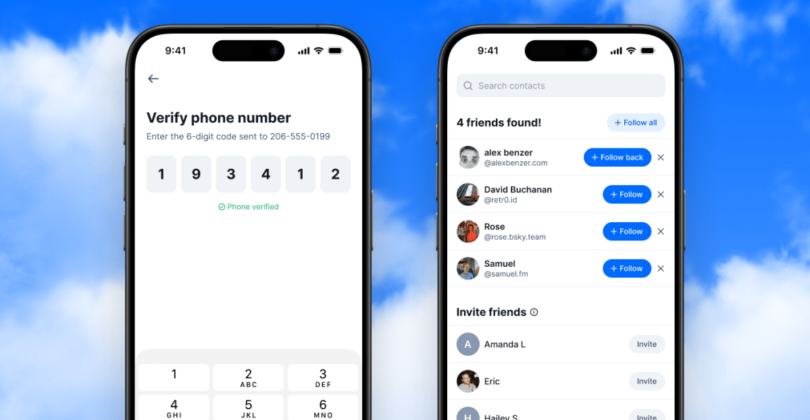
Bluesky is finally letting you find people you already know, one of several common features on other social platforms, like notifications and bookmarks, that have been notably absent at the growing upstart. Unlike rivals, it claims it’s not sacrificing privacy to do it.
The Find Friends feature is “privacy-first by design,” unlike what Bluesky says are “poorly implemented or abused” processes elsewhere. You verify your phone number, upload your contacts, and get pinged if — and only if — someone in your contacts book chose to do the same.
Bluesky says there are a few things making its approach different:
It only works if both people participate. You’ll only be matched with someone if you both have each other in your contacts and you’ve both opted into Find Friends. If you never use this feature, you’ll never be findable through it. Your coworker can’t use it to look you up unless you’ve uploaded their number from your contacts.
You verify your number first. Before any matching happens, you prove that you own your phone number. This prevents bad actors from uploading random numbers to fish for information about who’s on Bluesky.
Your contact data is protected even if something goes wrong. We store phone numbers as hashed pairs — your number combined with each contact’s number — which makes the data exponentially harder to reverse-engineer. That encryption is also tied to a hardware security key stored separately from our database.
You can remove your data anytime. Changed your mind? You can delete your uploaded contacts and opt out entirely.
Find Friends is initially limited to mobile app users in Australia, Brazil, Canada, France, Germany, Italy, Japan, the Netherlands, South Korea, Spain, Sweden, the UK, and the US. Access it by going to Settings in the mobile app and selecting “find friends from contacts.” You can also invite friends to join Bluesky, though texts will come from you, not the app.
And finally, don’t worry if it looks like you have no friends:
Matches might take time to appear if you’re one of the first to use this feature. As more people opt in, you’ll start seeing more connections.
Source link